#1 Dictation software for Windows & Mac
Speak instead of type: three times faster in Gmail, Word, Outlook
- Works in every app
- Three times faster than classic typing
- AI-powered autocorrect & punctuation
Speech to text: type three times faster in every app
Experience how much more you can get done with AI-powered dictation software. Compose emails, documents and messages in seconds — by voice instead of keyboard.

Classic typing costs you valuable time every day
Typing, phrasing, correcting. These things cost a lot of time and energy. Dictate your texts with VoiceAppear instead — if your time matters to you.
Typing slows down your flow of thought

Conventional typing
You make typos, have to correct, rephrase, your hands cramp up. You're stressed and spend 15 minutes on an unfinished email.

VoiceAppear dictation software
Speak your texts without worrying about punctuation, spelling or phrasing. The perfectly formatted email is ready to send in 30 seconds.

Release the handbrake.
Try the best dictation software for Windows and Mac.
- Never correct words again
- Write three times as fast immediately
- No more hand cramps while typing
Significantly less stress at work
- Writing emails and messages feels natural and effortless
- You get more done in less time, which can boost your standing with colleagues

No more misunderstandings
- Mentioning details is no longer a hurdle for you
- Never face embarrassment from typos again

Be the fastest person on the team
- Don't waste your time looking up or fixing words
- No looking up symbols and emojis — just speak them
- Get tasks done in a fraction of the time

The dictation software that automates every bit of formatting
Work can be hectic. We built VoiceAppear so you can focus on what matters — while the AI takes care of punctuation, formatting and correction.


Formatting work is now history

Works in Word, Outlook, Teams & every app

Effortless
Built for you.

VoiceAppear für Leader
Who doesn't want more efficient teams and happier employees? VoiceAppear delivers fast productivity gains — with no extra effort for your team.
SOC2 Type II compliant for Enterprise plans and HIPAA-ready for everyone — so you can work securely and efficiently.
The dictation software that understands what you mean to say
- Just speak your text without overthinking. The built-in autocorrect handles filler words and changes of mind automatically.

Your own vocabulary
- Add your personal words and names so they're always dictated correctly.

Text that sounds like you
- VoiceAppear automatically adapts to the app you're writing in to make sure the text reflects your authentic self.

Your privacy is at the center
VoiceAppear is privacy by design and strictly GDPR-compliant. Your voice data is never stored and never shared. Read our privacy policy for more information.
- Your voice inputs are never stored in our database and are permanently deleted within seconds.
- No. Your inputs are processed end-to-end encrypted and are visible only to you.
- Processing happens on servers inside the EU, fully GDPR-compliant and without forwarding to third parties.
- No. We never use your data to train AI models. Your privacy is our top priority.
Frequently asked questions about the dictation software
Everything you need to know about the VoiceAppear AI dictation software — how it works, which devices it runs on, and why it's better than the built-in dictation features of Windows and Mac.
- VoiceAppear is the leading AI dictation software for Windows 10, Windows 11 and macOS. It works in every app (Word, Outlook, Teams, Chrome) and turns speech into perfectly formatted text — including automatic punctuation and AI autocorrect.
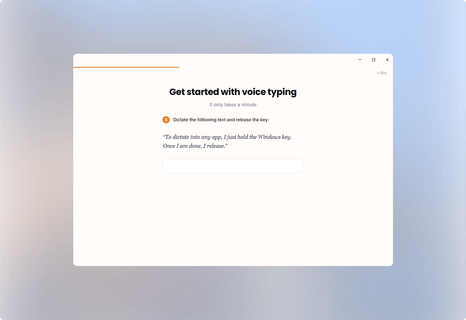
- Install VoiceAppear on your Windows or Mac machine, press a key and speak. Your spoken text appears instantly at the cursor position — no matter which app you're in.
- Windows 11 and macOS ship with a built-in dictation feature, but it's often inaccurate. VoiceAppear replaces it with AI-powered speech recognition that's up to 3× faster and more accurate.
- Yes. VoiceAppear works as voice input in every Windows and Mac app — Word, Outlook, Teams, Slack, Chrome, Gmail and any other program where you can write.
- VoiceAppear is free to try. The Pro version costs a fraction of Dragon NaturallySpeaking and is billed as a subscription — with no commitment.
- The built-in dictation features are based on older technology and struggle with punctuation, formatting and specialized terminology. VoiceAppear uses modern AI, understands context and formats your text automatically.
- Yes. Download VoiceAppear for Windows or Mac and try the full functionality without a credit card.
- VoiceAppear needs an internet connection so the AI speech recognition can run on EU servers in real time — that ensures the highest accuracy and GDPR compliance.
- For anyone who writes a lot at work: freelancers, leaders, remote workers, authors and anyone who wants to get emails, reports and notes done three times faster.
What our users say
No problems so far
Amazing what's possible
Almost everyone in our department uses it, and it helps a ton. Since it also understands whispering it doesn't bother anyone
It does what it's supposed to. Writing emails is definitely no longer a pain
i only use it in outlook
Best tool I used since chat gdp
What bothers me is it barely understands Latin
Unbelievable. I didn't even know I needed this until I tried it!! Please release a Chrome extension too :)
Absolute game changer. Can't live without it anymore
Start today with the #1 dictation software for Windows and Mac
Speak instead of type — and get three times more done in the same time.
- Works in Word, Outlook, Teams & every app
- Three times faster than classic typing
- AI-powered autocorrect & punctuation