The magic voice keyboard
Turn your Windowsfn or Windows key into a dictation button. 4x faster than typing. AI powered autocorrect. Works in any App




Just speak your texts 
Regular dictation tools type every word you say. VoiceAppear turns your natural speech into clean, ready-to-send text in any app
Automatic text-cleanup
If you stutter or change your mind mid-sentence, your text is corrected automatically
Works everywhere you write
You can use it in any input field on your computer. Just press the shortcut key and speak
100+ supported languages
We support all major languages across the USA, Europe and Asia. If you speak multiple languages, you will love the automatic language detection
Your questions, answered.
VoiceAppear is a desktop app for Windows and Mac that turns your speech into typed text. Hold a hotkey, talk, and on release it types the transcribed text directly at your cursor in any app or text field. It runs system-wide and supports 90+ languages.
Plans start at $5.83 per month billed yearly, or $8.99 billed monthly. Every plan begins with a 14-day free trial, no credit card required.
VoiceAppear supports all major languages, including English, German, French and 90 more. We also support switching languages mid-sentence, making it ideal for multilinguals.
Yes. VoiceAppear types wherever your cursor is, so it works in any app, browser, or text field on your computer.
Your transcripts and audio are never stored or shared. Everything is processed securely and discarded right after your text appears.
VoiceAppear scores 99%+ accuracy across all major languages, automatically removing filler words and fixing mistakes as you speak.
Simply download VoiceAppear and hold down the Windows button. Your spoken text will appear once the button is released.
Writers, developers, students, professionals, and more. As the technology keeps getting better, so does adoption, with people across every field switching to voice for faster, more natural input.
Absolutely. Every plan starts with a 14-day free trial, no credit card required.
What's new
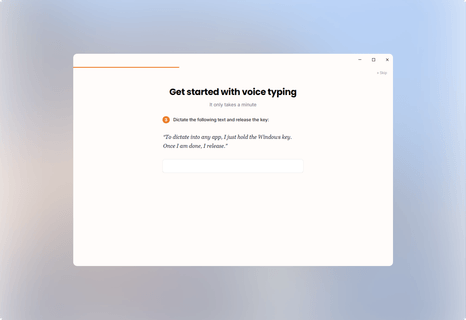
A simpler first-time setup
Setting up VoiceAppear for the first time is now a guided walkthrough in three parts: push-to-talk, hands-free dictation, and a practice email. Each part leads you through the steps one by one.
Better Claude Code dictation
VoiceAppear now recognizes commands, agents and filenames when you dictate in Claude Code.

A new floating bar design
The floating bar has a new design. Also, VoiceAppear now starts faster after you turn on your PC.

Transcripts now appear 3x faster
Transcripts now appear within ~300ms on average.